Enhanced MyAnimeList Client • 100% Free • Zero Telemetry

Your Anime Journey.
Fast. Pure. Private.

The Android anime & manga companion built for enthusiasts. Stream high-definition opening & ending themes, browse seasonal music, track your reading lists, and manage your libraries with fluid native gestures.

Version v0.7.5 · Android 7.0+ (API 24+) to Android 15 · De-Googled OK (GrapheneOS / microG)
📚
Anime & Manga Full MyAnimeList Sync
🎵
OP/ED Player Native Theme Streaming
🧭
Discovery Hub Personalized Recs
🛡️
100% Free & Clean Zero Ads, Zero Trackers
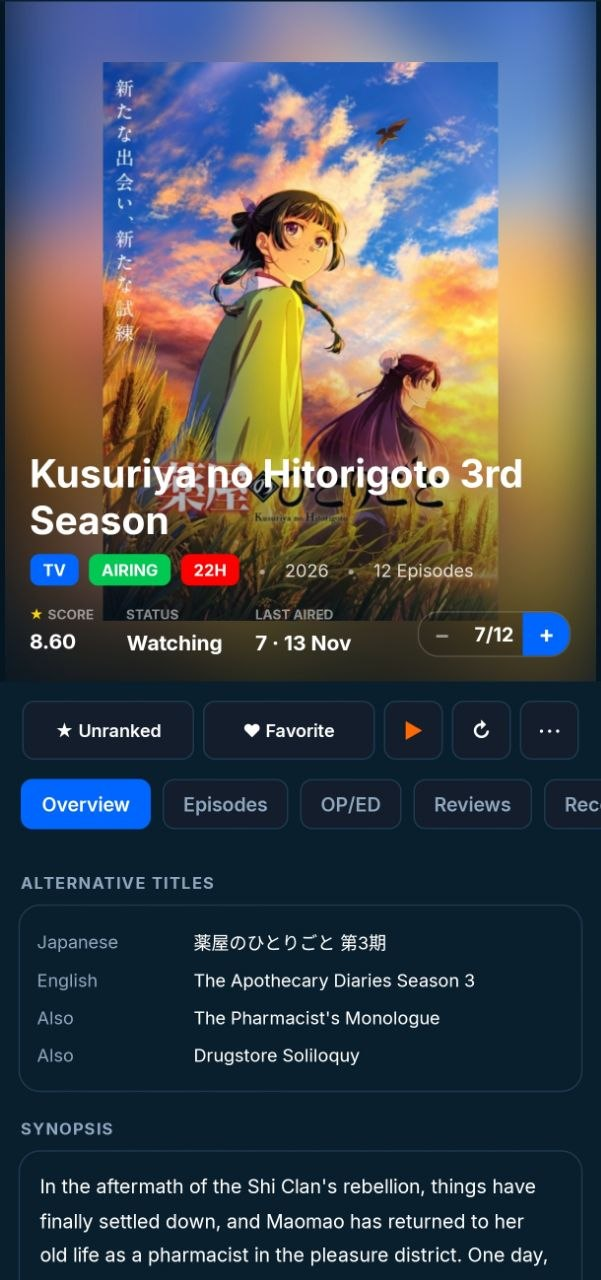
MAL+ Anime Details with AnimeThemes Player
0% Zero Ads & Zero Trackers
100% Standalone (No Google Services)
Media3 ExoPlayer AnimeThemes Streaming
.NET 11 Native MAUI Performance
App Experience

Engineered for
Performance & Privacy

No sluggish webviews or generic wrappers. Every screen is crafted with native Android controls for instantaneous response.

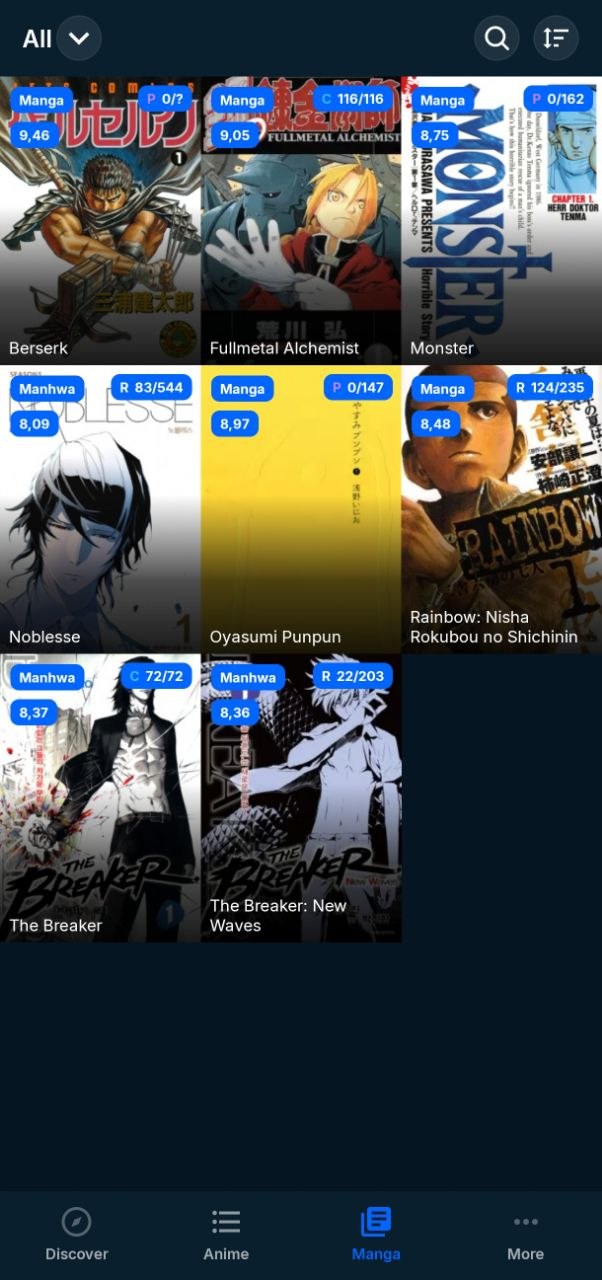
MAL+ Manga Library
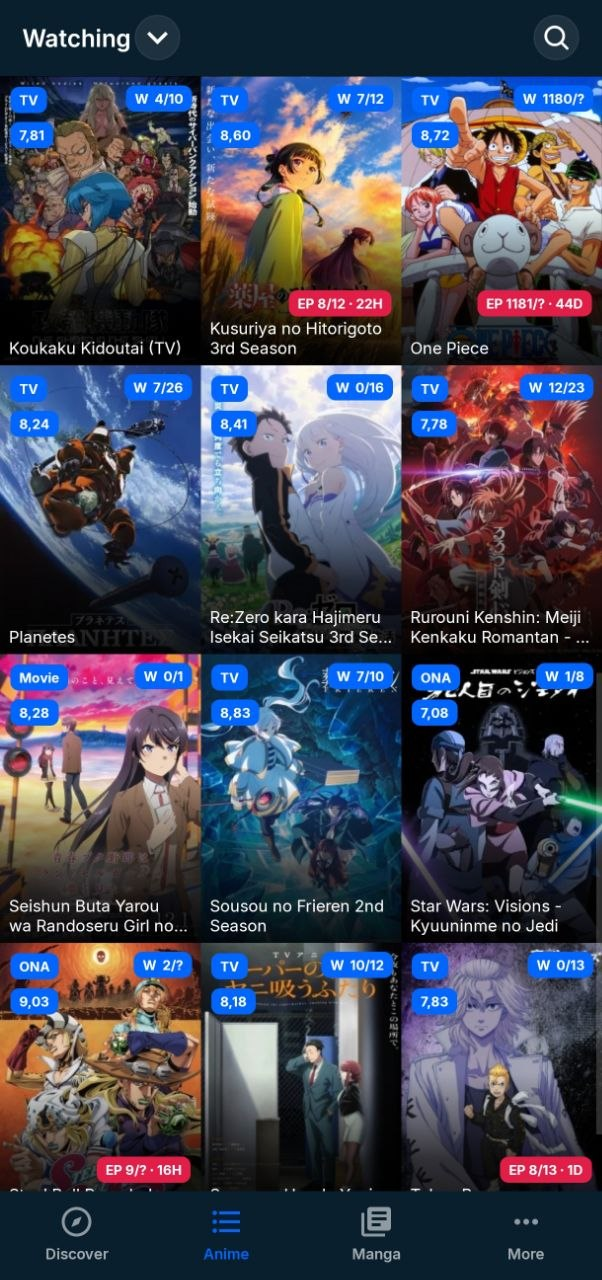
MAL+ Anime Library
Dual Library

Anime & Manga in Unified Harmony

Seamlessly switch between watching and reading. Track your entire library with instant 120Hz gesture scrolling, custom format chips, and real-time MAL synchronization.

  • Manga & Manhwa Tracking: Full support for reading progress chips (Chapters / Volumes), custom status tags, and score badges.
  • Customizable Poster Chips: Toggle TV, Movie, OVA, Manga, and Manhwa tags directly on cover posters.
  • Flexible Scoring Views: Choose between community MAL ratings, personal scores, or clean uncluttered posters.
  • Offline Seed Cache: Loads your library in milliseconds without Wi-Fi, completely eliminating blank error screens.
MAL+ Anime Details
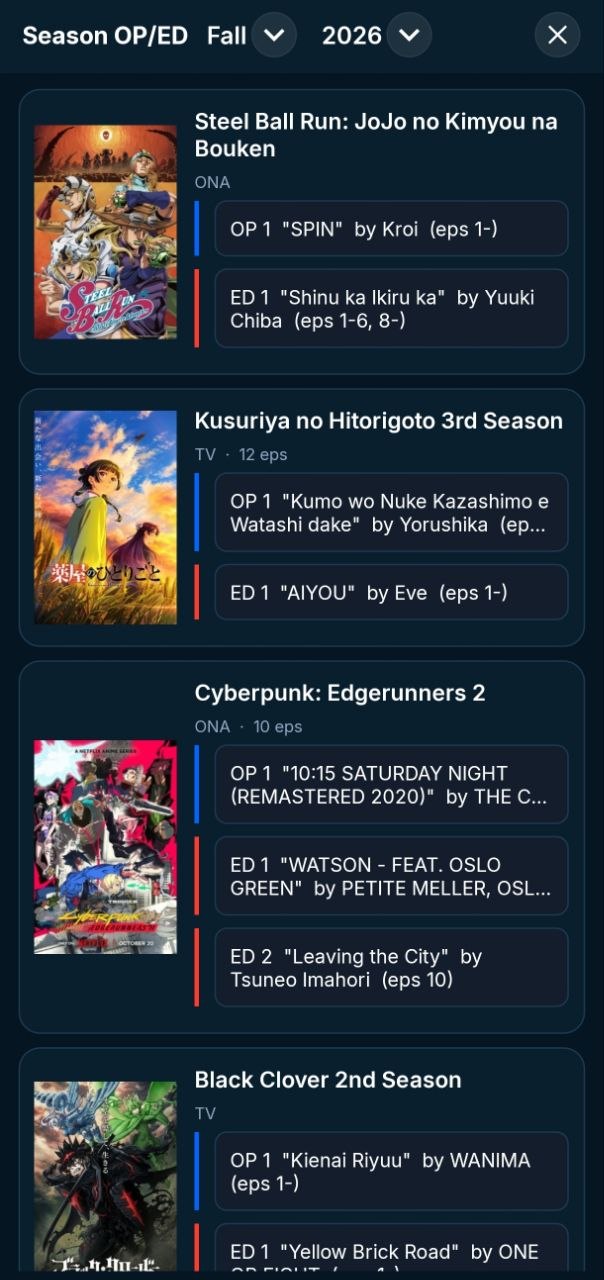
MAL+ Seasonal OP/ED Catalog
Integrated Media

Seasonal OP & ED Catalog + ExoPlayer

Browse theme music for current broadcast seasons (Steel Ball Run, Kusuriya, Edgerunners 2, Black Clover) with dedicated blue OP and red ED stream tags.

  • Curated Seasonal Music: Browse every opening and ending song of the broadcast season with artist credits and episode ranges.
  • Native ExoPlayer Streaming: Stream creditless 1080p anime themes with native AndroidX Media3 video and audio playback.
  • Episode Airing Countdowns: Live timestamps calculate exact countdowns to upcoming episode broadcasts.
  • Zero External Apps: Play songs directly in-app without switching to YouTube or third-party web browsers.
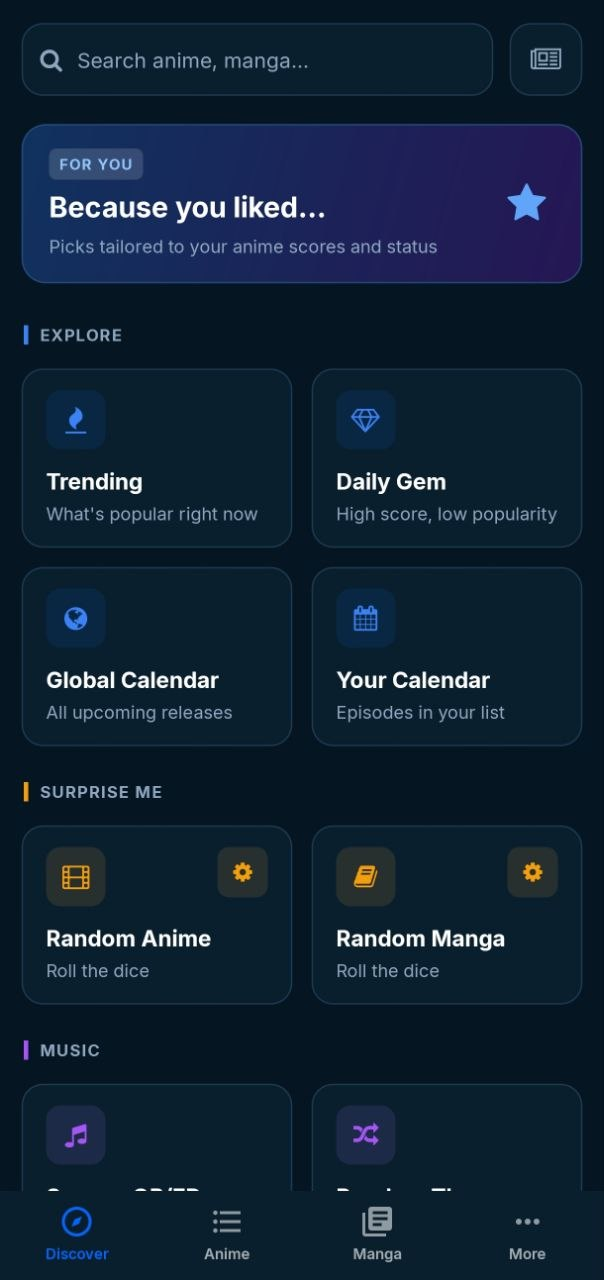
MAL+ Exclusive Discovery Hub
Discovery Hub

Unearth Your Next Favorite Story

Tired of generic top charts? MAL+ includes specialized exploration tools crafted to help you discover hidden gems tailored to your personal taste.

⭐ "Because You Liked..." Algorithmic picks derived from your personal scores.
🔥 Trending Now Live community watching trends & buzz.
💎 Daily Gem Finder High-score, low-popularity hidden anime classics.
📅 Broadcast Calendar Global releases with exact airing countdowns.
🎲 Surprise Me Dice Configurable random anime & manga selector.
🎵 Season Themes & Roulette Stream all seasonal OP/ED songs or roll random videos.
Visual Tour

Explore Every Screen

A tour through the authentic, native Android interface of MAL+.

MAL+ Screen Tour
Library & Tracking

Anime Library

Silky 120Hz scrolling across your watching, completed, and plan-to-watch lists with squircle chip filters and custom poster format badges.

100% Native ViewPager2 navigation
Pre-seeded offline cache (instant boot)
Anchored persistent bottom navigation
The Difference

Why Power Users
Choose MAL+

A breakdown of architectural and privacy advantages over the official app.

Core Capability
ENHANCED CLIENT
MAL+
DEFAULT
Official App
Privacy & Telemetry Tracking, analytics, and advertising
100% Ad-Free, 0 telemetry
Ad network & Google analytics
Theme Music (OP/ED) Streaming opening & ending video themes
Native ExoPlayer (Media3)
No music playback
Seasonal Music Hub Broadcast season themes catalog
Dedicated season OP/ED browser
Not available
Interface & Navigation Gestures, page transitions, and fluidity
120Hz native ViewPager2 swipes
Laggy WebViews & slow tabs
Offline Reliability Startup speed and behavior without internet
Instant offline seed bundle cache
Blank loading & error screens
De-Googled Freedom Compatibility with custom ROMs
100% Standalone (GrapheneOS/microG)
Strict Google Play Services dependency
Library Customization Poster chips, rating modes, and layouts
Format chips, score modes, season tags
Rigid, non-customizable list view
Quick Start

User Guide & Walkthrough

Get up and running with MAL+ in less than two minutes.

1

Sign In with MyAnimeList

Log in securely with your MAL account. Your anime and manga collections sync immediately with zero telemetry. Any progress, scores, or tags update back to MAL automatically.

2

Fluid Swipe Gestures

Swipe horizontally anywhere on the screen to switch between Discover, Anime Library, Manga, and More. The anchored bottom navigation maintains your state seamlessly.

3

Stream Theme Songs (OP/ED)

Navigate to any anime's details page and switch to the OP/ED tab, or open the Seasonal OP/ED catalog in Discover. Tap any theme song to launch native ExoPlayer playback with creditless video or audio.

4

Personalize Your Posters & Chips

Configure format chips (TV, Movie, OVA, Manga, Manhwa), toggle between community MAL ratings or your personal scores, and choose between Grid, Compact, and Detailed list views.

5

Explore the Discovery Hub

Use "Because You Liked..." to get algorithmic recommendations, check live broadcast countdowns, or roll the Music Theme Roulette to discover random songs.

6

Seamless In-App Updates

MAL+ automatically checks GitHub Releases for new updates and alerts you in-app. Upgrade with a single tap without needing Google Play.

Open Source

Developer & Build Guide

Everything you need to compile and iterate on MAL+ locally.

C# 13 .NET 11 MAUI AndroidX Media3 (ExoPlayer) Android 7.0 (API 24) to Android 15 MVVM Pattern
1

Prerequisites & Environment

Ensure you have the pinned toolchain installed:

  • .NET 11 SDK (preview release with allowPrerelease: true in global.json).
  • JDK 21 (Microsoft Build of OpenJDK 21 or Eclipse Temurin). Set JAVA_HOME.
  • Android SDK: API 33, API 34, API 35 with Platform Tools (adb).
Terminal
dotnet workload install maui-android
2

The Quick Dev Loop (`build_and_deploy.ps1`)

The root PowerShell script builds an incremental Debug APK and deploys it over USB or Wi-Fi ADB in approximately ~40 seconds:

PowerShell
# Automatically detects device, compiles incrementally, installs, and launches
.\build_and_deploy.ps1

# Or specify a target wireless ADB device:
.\build_and_deploy.ps1 -Device "192.168.1.50:43539"
3

Manual Command-Line Builds

Compile directly with the .NET CLI:

Terminal
# Debug APK (embeds assemblies to prevent native SIGABRT)
dotnet build MALPlus/MALPlus.csproj -f net11.0-android37.0 -p:Configuration=Debug

# Release APK (optimized with R8/linker)
dotnet build MALPlus/MALPlus.csproj -f net11.0-android37.0 -p:Configuration=Release
4

Architecture Invariants

  • Shell built in C#: AppShell.cs constructs the navigation hierarchy in code, avoiding MAUI RC CS0200 XAML limitations.
  • Debug Linker Flags: Retain EmbedAssembliesIntoApk=true and AndroidLinkMode=SdkOnly to prevent startup aborts and JIT latency.
  • Full Documentation: Read the repository's DEVELOPMENT_AND_BUILD.md for full architecture insights.
Help & Answers

Frequently Asked Questions

Is MAL+ free, safe, and open-source?

Yes. MAL+ is 100% free and open-source under the GPL-3.0 license. There are no ads, subscriptions, or hidden analytics. Every line of code can be audited on the official GitHub repository.

Does MAL+ work on De-Googled devices (GrapheneOS / microG)?

Yes! Unlike the official app, MAL+ has zero dependency on Google Play Services or proprietary frameworks. It runs smoothly on stock Android as well as GrapheneOS, CalyxOS, LineageOS, or microG.

How does the AnimeThemes OP/ED streaming player work?

MAL+ queries the AnimeThemes catalog and embeds AndroidX Media3 (ExoPlayer) natively. When viewing an anime's details or the Seasonal OP/ED hub, you can tap any opening or ending song to stream high-definition creditless video or audio directly inside the app.

How do I install or update the app?

Download the latest com.idarkalex.malplus.apk from GitHub Releases. Once installed, MAL+ includes a built-in updater that checks for new releases and lets you update with a single tap.

Does it synchronize with MyAnimeList?

Yes. You authenticate securely with your official MyAnimeList credentials. Any episode watched, score changed, or volume read is instantly reflected on your MAL profile.

Experience the Better Way to Track Anime

Free. Ad-free. Open-source. Built for Android enthusiasts.

Direct APK from GitHub Releases · v0.7.5 · Android 7.0+